

Recruiting operations
How to Improve Project Resource Planning
Step-by-step guide to boost your project resource planning: define scope, inventory skills, forecast demand, allocate wisely, and monitor changes.
Project resource planning feels chaotic when you can’t see who’s free, what skills they have, or when equipment will be available. Follow these five steps and turn that mess into a clear, actionable plan you can trust.
Step 1: Define Project Scope and Resource Needs
Start with a short scope statement that lists the project’s goals, deliverables, constraints, and success criteria. Write it in plain language so every stakeholder can read it without a glossary.
Next, break the work down into a work-breakdown structure (WBS). Each WBS element becomes a task that you can attach a resource requirement to.
Ask yourself three questions: what roles are required, what skills each role must have, and how long each task will run. Capture the answers in a simple table. You don’t need fancy software at this point.
Finally, get stakeholder sign-off. When everyone agrees on the scope, you avoid later scope creep that would force you to re-estimate resources.
Step 2: Inventory Skills, Availability, and Capacity
Collect a current skill matrix for every consultant on your bench. List certifications, years of experience, and preferred industries. A quick spreadsheet works, but a dedicated tool can auto-populate fields from resumes. A current view of skills and availability can also help IT consultancies identify follow-on projects for consultants on the bench before availability turns into idle time.
Overlay that matrix with each person’s calendar. Mark vacations, training, and any non-project work (like internal support tickets). This gives you usable capacity rather than just theoretical hours.
For a visual snapshot, use a shared resource calendar that shows green for free time, amber for partial load, and red for overload. Color-coding can make bottlenecks easier to spot at a glance.
When you see a consultant who matches several high-value skill sets but is booked solid, note the conflict. You’ll need to either shift lower-priority work or bring in a contractor.
WiseMatcher can pull the skill data from your existing resumes and match it to upcoming contract opportunities, saving you hours of manual cross-checking.
Step 3: Forecast Demand and Find Resource Gaps
Take the task list from Step 1 and estimate the effort for each task in person-days or person-hours. Use historical data from similar projects whenever possible. That reduces guesswork.
Summarize the effort by role and skill. For example, you might need 120 hours of senior Java consulting, 80 hours of data-engineer support, and 40 hours of QA testing.
Now compare the demand numbers with the capacity you recorded in Step 2. Any shortfall shows a gap; any excess shows idle capacity, and estimating the cost of an idle bench day helps you understand its business impact.
To illustrate, imagine a six-month rollout that needs 200 hours of senior consulting but you only have 150 hours free. That 50-hour gap could be closed by hiring a contractor, up-skilling a junior consultant, or re-sequencing lower-priority work.
Step 4: Allocate Resources and Build a Workable Schedule
With demand and capacity aligned, assign each task to a specific consultant. Choose the person whose skill profile best fits the task, then verify that they have enough free hours in the target window.
Enter the assignments into a scheduling tool that supports dependencies. The tool should automatically push dates forward when a predecessor slips, so you always see the realistic finish date.
When a critical resource is over-allocated, consider one of these options: split the work with a peer, delay the low-impact task, or bring in external help. Document the decision so the rationale is clear to the project sponsor.
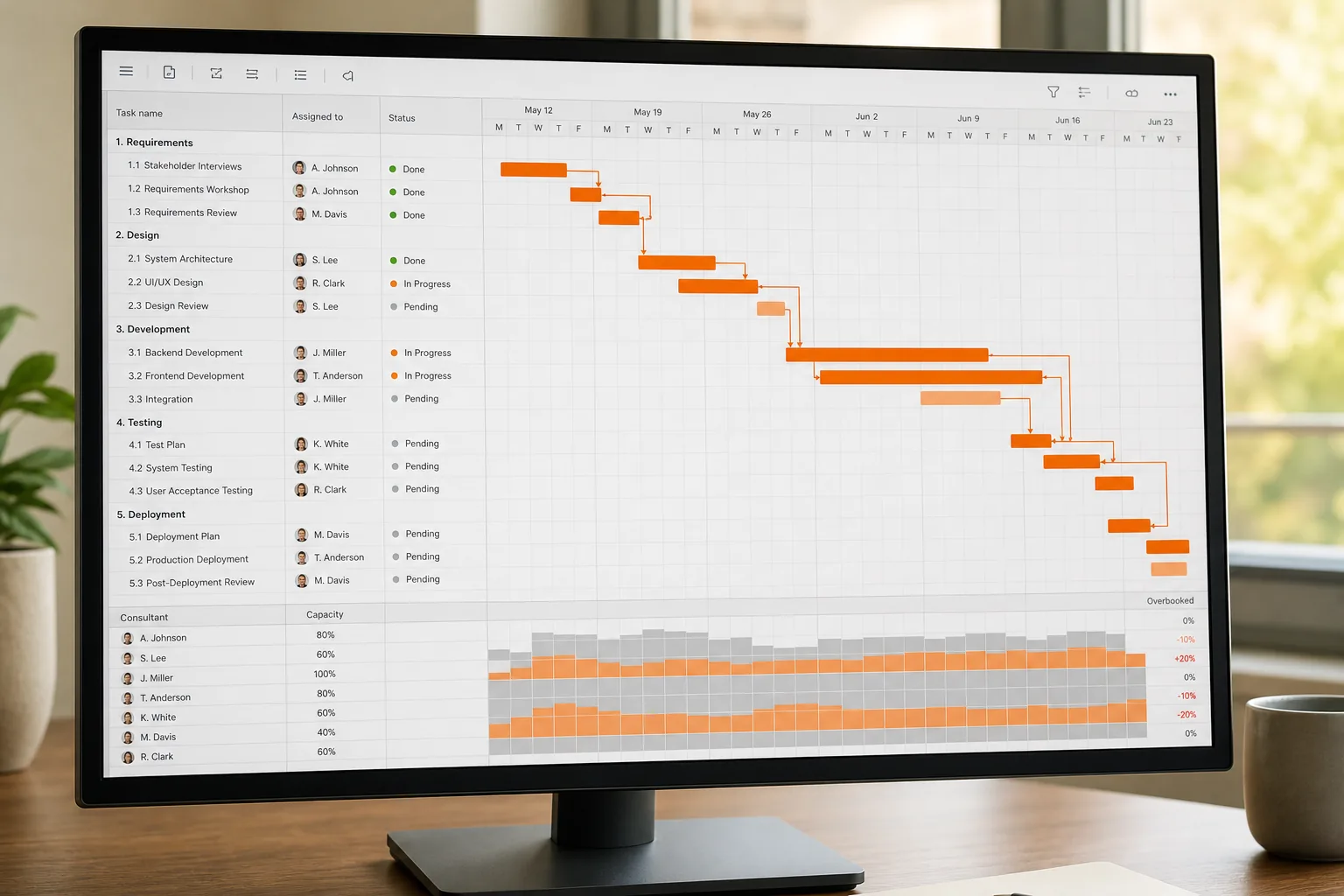
WiseMatcher’s AI matching engine can suggest which consultants are most likely to fit a new contract, letting you plug those suggestions straight into your schedule.
After the schedule is set, share it with the whole team. A single source of truth prevents the "I thought someone else was doing that" emails that derail timelines.
Step 5: Monitor Progress and Replan as Conditions Change
Track actual work against the plan every week. Use a simple status column: "Not started," "In progress," "Blocked," or "Done." This visual cue lets you spot slipping tasks early.
If a consultant falls ill or a key piece of equipment is delayed, adjust the schedule immediately. Most tools let you drag a task bar to a new date; the dependent tasks shift automatically.
Run a quick variance analysis: compare planned hours versus logged hours. A consistent overrun of 10 % signals that your estimates may be too low or that scope is creeping.
When variance exceeds a threshold, hold a short re-planning meeting. Re-prioritize the backlog, re-assign resources, or request additional budget. Keep a log of these decisions; it becomes a knowledge base for future forecasts.
Finally, close the loop by feeding actual effort data back into your skill matrix. Over time, your estimates become more accurate, and the whole resource planning cycle speeds up.
FAQ
What is the first thing to do in project resource planning?
The first step is to write a clear scope statement and break the work into a detailed task list. That gives you the foundation for all later estimates.
How often should I update my resource plan?
You should review and update the plan at least once per sprint or weekly, whichever cadence matches your project rhythm, to capture changes in availability or demand.
Can I use a simple spreadsheet instead of specialized software?
Yes, a spreadsheet works for small teams, but it quickly becomes error-prone when you have many dependencies. A purpose-built tool adds automation and visual alerts that a spreadsheet lacks.
What metrics help me know if my resource plan is working?
Key metrics include utilization rate, schedule variance, and the number of over-allocated resources. Tracking these shows where you’re on target and where you need to adjust.
How does AI help with resource planning?
AI can scan resumes, match skill tags to project needs, and suggest the best consultants for each task, reducing manual search time dramatically.
Should I involve stakeholders in the planning process?
Absolutely. Getting early input on priorities and constraints ensures the plan reflects real business goals and avoids costly re-work later.
Ready to put this into practice? See how WiseMatcher matches your consultants to contract opportunities.